How Works
After the AVA login process, all groups in which the user is participating are displayed. You can create a new group, access user settings, or join a group using a key provided by its owner.
After creating (or entering) a group, the user is redirected to the interface shown in the following figure (figure that represents a group that has already been edited). In this interface the possible operations are:
- Add a PoK: by clicking on the "+ POK" button (letter A in the figure);
- Edit / View a PoK: by double clicking on it (letter B in the figure);
- Remove a PoK: by clicking on it and then in the trash (letter C in the figure);
- Share a private PoK with the members of the group: by clicking on it and then on the padlock figure (letter C in the figure);
- Reposition a PoK: by clicking on it (letter B in the figure and then C) and dragging it;
- Connect it to another PoK: by clicking on it (letter C in the figure and then D) and using one of the side circles, connect it to another PoK;
- Request recommendations for access to the materials, using an algorithm that checks the latest PoK accessed by the current user and which was the next to be accessed by the majority using the group (letter letter in figure E);
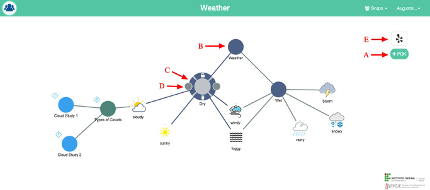
The PoKs and connections shown in the interface can be created by another member (s) of the group, or by yourself. However, this is your view, all changes do not affect the map of the other members unless you create another PoK and request its publication.
Important! Once a PoK has been published, it is no longer possible to edit it.